


The Metronome by Soundbrenner
4.64.68K Reviews
App Specs
- Version
- 1.33.2
- Updated On
- License
- Free
- Downloads
- 5,000,000+
- Developer
- Soundbrenner
- Categories
- Music & Audio
- Platform
- Android
Screenshots

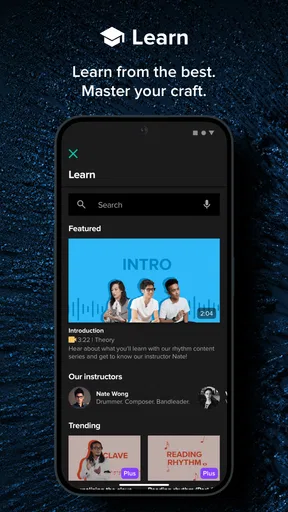
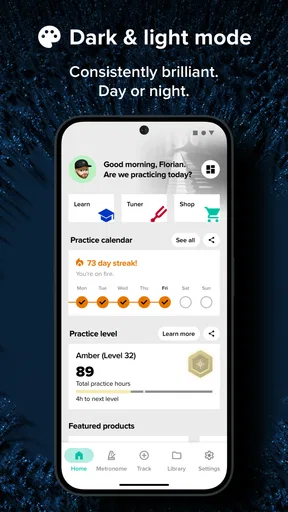
 Analysis by AppCompare
When I use a metronome, I want the beat to be easy to start, easy to hear, and easy to adjust before a musical idea slips away. The Metronome by Soundbrenner is a music-and-audio app built around that practical need, with extra tools for shaping and organizing practice. Its appeal is not that it turns every session into a polished performance; it is that it can make timing more deliberate, whether I am warming up alone or preparing a sequence of pieces.
How quickly you can get to the beat
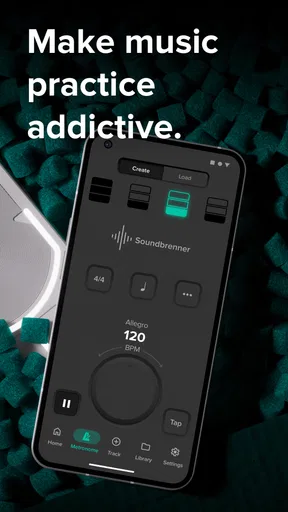
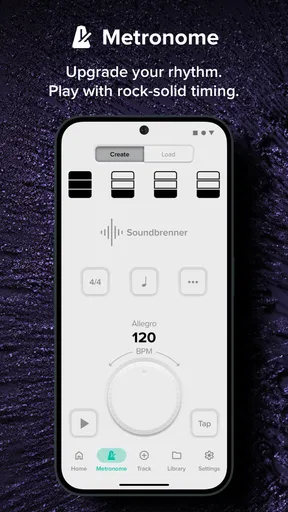
A metronome is only useful if setting it up does not interrupt the work. This app is designed to be intuitive: open it, choose a tempo, and start playing. That straightforward starting point makes it approachable for a beginner who simply wants to keep a steady pulse, while the adjustable musical settings give experienced players room to work on more specific patterns.
Speed here is best understood as getting from an idea to a usable beat, not as a promise about how quickly every phone will respond. If I am practicing a short passage, I can set a tempo and concentrate on the phrase rather than spend the session navigating a complicated interface. The trade-off is that musicians who only ever need a single, plain click may find the wider set of options unnecessary.
Keeping time through demanding sessions
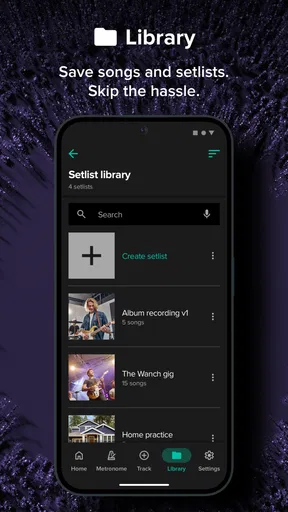
The app becomes more useful when a session involves several tempos or feels. Its setlist feature lets me arrange different tempo and time-signature settings in advance, so changing from one piece or section to another does not have to mean stopping to rebuild the metronome setup. That is a small workflow choice with a real benefit: it helps preserve concentration during a rehearsal or a focused practice block.
Customization reaches beyond the tempo. I can work with time signatures, subdivisions, accents, and different metronome sounds. A musician practicing an uneven meter, for example, can shape the pulse around the piece instead of treating every beat as identical. I would still prepare and check those settings before a demanding run-through; having options is helpful, but choosing the wrong accent pattern can make practice less useful rather than more precise.
Reliability, sound, and connection
Sound is a practical choice, not just a cosmetic one. A click that cuts through a quiet room may be hard to follow beside other instruments, while a sound that is comfortable for solo practice may not suit everyone. The app allows me to change the metronome sound, and headphones offer a private way to hear the pulse when the room is noisy or other people are nearby.
Soundbrenner’s wearable devices add another way to follow the beat: tactile feedback. I can see why that could help a musician who finds an audible click difficult to pick out while playing, or a group that wants a shared sense of pulse. It is a more specialized setup than using the phone alone, so I would treat the wearable connection as an optional advantage rather than a requirement for getting value from the app.
Worth Reading Before You Choose

Flipboard Shows What News Apps Must Do Beyond the Feed

Switching to Android Auto Means Rethinking Your Driving Routine

Google Calendar Makes a Crowded Week Easier to Manage

Ludo King Makes the Most of the Minutes Between Plans

Baby Panda World Brings Quick Play to Modern Phones, but Its Game Library Feels Busy

ESPN’s Live Game View Makes Following Close Games Easier
Device expectations and performance verdict
The app is available on Android and iOS, works offline, and can connect with DAWs such as Ableton Live and Logic Pro. Offline use is especially practical: I can work somewhere without internet access without making a network connection part of the practice routine. DAW integration is more relevant to recording than to everyday scale work, so its value depends on how I make music.
Soundbrenner is the developer, and the app has been available since December 15, 2015. It is free to download, rated for Everyone, and supported by optional in-app purchases priced from $4.99 to $199.99 per item. The current version is 1.32.8, and it requires Android 10 or later on Android devices. That minimum is worth checking if I plan to install it on an older phone. The app has a 4.6 average from around 87,000 ratings, with over 5 million installs, so it is a well-established choice rather than an obscure utility.
Your Personal Timekeeper
Let’s dive into what makes this app a must-have for musicians of all levels. First off, it’s more than just a basic metronome. Sure, it does the classic tick-tock thing, but it does it with style and precision. The app is designed to be intuitive, which means you won’t have to spend ages trying to figure it out. Just open it up, set your tempo, and you’re good to go.
One of the coolest features is its ability to sync with Soundbrenner’s wearable devices. Imagine feeling the beat on your skin. Yeah, it’s as cool as it sounds. This tactile feedback can be a game changer, especially if you’re playing in a band or an orchestra. Everyone can stay on the same page—or beat, in this case.
Customizable and User-Friendly
Customization is where this app really shines. You can adjust the tempo, time signatures, and even customize subdivisions and accents. Want a 7/8 time signature with a triplet feel? No problem! The app lets you tailor the metronome to fit your specific needs. Plus, the interface is super clean, so you’re not overwhelmed with options.
For those who love to tweak, there’s also the option to change the metronome sound. You can select from a range of different sounds to find the one that’s most pleasing to your ear. And if you’re practicing in a noisy environment, just plug in your headphones and keep the beat all to yourself.
Practice Made Perfect
Now, let’s talk about practice. We all know that practice makes perfect, but it’s also true that perfect practice makes perfect. The app’s setlist feature is a lifesaver for those long practice sessions. You can create setlists with different tempos and time signatures, making it easy to switch between songs or sections without breaking your flow.
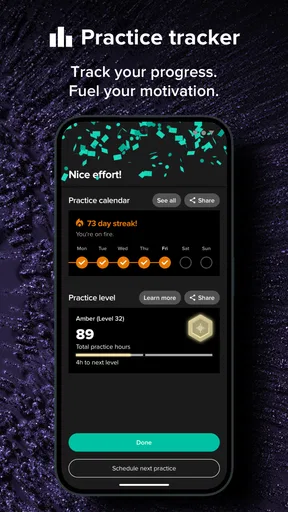
There’s also a practice mode that tracks your progress. It’s like having a personal coach that keeps you honest. You can set practice goals and monitor how well you’re keeping time. It’s a great way to stay motivated and see how you’re improving over time.
“The Metronome by Soundbrenner is like having a digital conductor in your pocket.”
Integration and Connectivity
Another standout feature is its integration capabilities. The app syncs seamlessly with DAWs (Digital Audio Workstations) like Ableton Live and Logic Pro. If you’re into recording, this can be a huge advantage, as you can keep everything in sync without a hitch.
The app is available on both Android and iOS, so no matter what device you’re using, you can keep time with ease. Plus, it’s designed to work offline, which means you don’t have to worry about losing your groove if you’re practicing in a location without internet access.
Choosing it over a basic click or other tools
Compared with a simple built-in phone metronome, this one makes more sense when I need accents, subdivisions, unusual meters, or a planned sequence of pieces. A basic click is often quicker for a one-off warm-up and avoids presenting controls I will not use. For a musician who wants to hear a beat and nothing else, that simpler option may be the better fit.
Compared with a physical metronome, the phone app is easier to carry alongside other practice tools and can offer more ways to shape the pulse. A physical unit may still suit someone who prefers a dedicated device and does not want a phone involved in practice. I would choose based on the room and the routine: headphones help with privacy, while a wearable can make the beat perceptible without relying only on sound.
A useful habit is to save or prepare the settings for a practice sequence before starting, then use the setlist to move between sections. That keeps adjustments from becoming a distraction mid-phrase. For a tricky passage, I would also make one change at a time—tempo first, then subdivision or accent—so I can tell which adjustment is actually helping my timing.
A realistic practice routine
Imagine I have a short evening session after work and want to cover a warm-up, an uneven-meter passage, and a song section at a different tempo. I can set the relevant beats beforehand and put them in a setlist, then keep the phone nearby while I play. If the click is masked by the instrument, I can try another sound or use headphones; if I am rehearsing with others and have a compatible Soundbrenner wearable, tactile feedback gives me another way to stay with the pulse.
This is where the app’s breadth helps: I do not need to stop after every exercise to create a completely new timing setup. It also shows the limit of the tool. It can provide a reference and organize the sequence, but it cannot decide whether my phrasing feels musical or whether I am practicing a passage cleanly. I still need to listen critically and adjust the exercise to the music, not merely chase a number on the screen.
Practice tracking and useful limits
The practice mode is intended to track progress and let me set goals, which can be helpful when I want a routine rather than an unstructured stretch of playing. I would use that tracking as a nudge to return consistently, not as a complete measure of musicianship. Keeping time is only one part of practice, and a record of sessions cannot replace attention to tone, articulation, relaxation, or the quality of each repetition.
There is also a difference between having many settings and needing them every day. A beginner may benefit from starting with a plain beat and adding subdivisions only when a teacher or a passage calls for them. A more advanced player may value the control, but should still check the meter and accents before relying on them in rehearsal. The app is at its best when the extra choices solve a concrete musical problem, rather than when I adjust settings just because they are available.
For someone asking whether the app is useful without a wearable, the answer is yes: the phone metronome can be used on its own, while tactile feedback is an additional option. Someone wondering whether it works away from Wi-Fi can practice offline. And if recording is part of the workflow, its DAW connections may matter; if not, they can be ignored without getting in the way of ordinary practice.
Who will get the most from it
I would recommend it to players who move between different tempos and meters, want to shape subdivisions or accents, or benefit from organizing a longer session before they begin. It is also a sensible choice for musicians who practice in places where internet access is unreliable, or for people who want the option of wearable feedback and DAW integration in the same metronome app.
I would steer away from it if all I wanted were the smallest possible tool for a steady click, or if I preferred not to use a phone during focused practice. A musician working on a very specific ensemble setup should also test the chosen sound and workflow before a performance rather than assuming that a phone speaker will be easy to hear in every room. The app offers useful flexibility, but the right listening method depends on the instrument, the space, and the people playing together.
Final Thoughts
To wrap things up, The Metronome by Soundbrenner is not just an app; it’s a comprehensive tool for musicians who want to elevate their practice and performance. Whether you’re a beginner looking to keep a steady beat or a seasoned pro aiming for precision, this app has something to offer.
With its user-friendly interface, customizable features, and seamless integration with wearable tech and DAWs, it’s hard not to love this app. So, if you’re ready to take your practice sessions to the next level, give The Metronome by Soundbrenner a try. Your future self—and your fellow band members—will thank you!
Pros
- User-friendly interface for easy navigation.
- Customizable time signatures and subdivisions.
- Vibrating metronome for silent practice.
- Syncs with multiple devices seamlessly.
- Offers a wide range of tempo options.
Cons
- Limited free features without upgrade.
- Battery drain with continuous use.
- Occasional connectivity issues.
- Vibration feature may be too subtle.
- Requires account for full functionality.
FAQs for The Metronome by Soundbrenner
What platforms is The Metronome by Soundbrenner available on?
The Metronome by Soundbrenner is available on both Android and iOS platforms. You can download it from the Google Play Store for Android devices and the Apple App Store for iOS devices. It’s compatible with a wide range of smartphones and tablets, making it accessible for most users.
Does The Metronome by Soundbrenner offer customizable time signatures?
Yes, The Metronome by Soundbrenner allows users to customize time signatures to suit various musical needs. You can set any time signature you require, from common ones like 4/4 and 3/4 to more complex structures. This flexibility makes it a valuable tool for musicians of all genres.
Is there a cost to download and use The Metronome by Soundbrenner?
The basic version of The Metronome by Soundbrenner is free to download and use, offering a wide range of features. However, there may be in-app purchases or a premium version available that provides additional features and customization options for advanced users seeking more functionality.
Can The Metronome by Soundbrenner sync with other devices?
Yes, The Metronome by Soundbrenner can sync with other devices via Bluetooth. This feature allows you to connect with Soundbrenner wearable devices for a more integrated experience. It ensures precise timing whether you are practicing alone or coordinating with a group of musicians.
Is The Metronome by Soundbrenner suitable for beginners?
Absolutely, The Metronome by Soundbrenner is designed with an intuitive interface that makes it suitable for both beginners and seasoned musicians. It includes tutorials and user-friendly settings that help new users quickly understand and utilize all its features effectively, enhancing their practice sessions.


